braid
A local-first issue tracker for LLM agents (and the humans they work with).
braid stores a project’s issues in a skein: a single automerge CRDT document, synced through an automerge sync server. A single issue is a strand (full vocabulary: terminology). There is no git involvement and no daemon: any number of agents across machines, branches, and worktrees can create, edit, and close strands in parallel — replication and conflict resolution come from the CRDT, not from merge tooling.
braid is heavily inspired by beads:
it borrows the issue shape, dependency types, and ready/blocked workflow,
while replacing the git-committed issues.jsonl + SQLite machinery with a
synced document. (That JSONL file still matters: braid import migrates
it.)
Where to next
- New here? Install braid, then walk the quick start.
- Running it for real? Read the document id is a secret — the doc id is a bearer token — and point braid at your own configuration.
- Wiring up an agent? Shell-capable agents use the CLI (
braid agents-info); shell-less ones use the MCP server. - Coming from beads? See migrating from beads.
Installation
curl -fsSL https://raw.githubusercontent.com/cscheid/braid/main/install.sh | bash
Installs the latest release to ~/.local/bin after verifying its
SHA-256 checksum and its Ed25519 signature (release archives are
signed with minisign, the tool
Zig signs its releases with). Signature verification is mandatory, so
the installer needs minisign present — brew install minisign,
apt install minisign, dnf install minisign, or apk add minisign
first. Prebuilt binaries cover Linux x86_64/ARM64 (statically linked —
works on any distro, Alpine included), macOS Intel/Apple Silicon, and
Windows x86_64 (see below). The installer never asks questions and never
edits your shell config; if ~/.local/bin isn’t on your PATH it tells you
the line to add.
The release signing key (since v0.2.1; pinned in install.sh, which
ships from the main branch — not from the release being verified):
RWSbWhSzVkkTRO4nFMzL/KyRs9oicbgy/2KPRK+o9hxznRYx9ZkHwwlN
To verify a manually downloaded archive:
minisign -Vm braid-<version>-<platform>.tar.gz -P <key above> — the
trusted comment should name exactly the file you downloaded. If the
signing key is ever rotated, the new key lands here and in install.sh
in the same commit; releases keep the signatures they shipped with.
Useful flags (pass after bash -s --):
# specific version, custom directory
curl -fsSL .../install.sh | bash -s -- --version v0.2.1 --dest ~/bin

# build from source instead (needs a Rust toolchain)
curl -fsSL .../install.sh | bash -s -- --from-source

# install without signature verification (not recommended; note the
# flag goes after `bash -s --`, not on bash itself)
curl -fsSL .../install.sh | bash -s -- --insecure-skip-signature

# remove an installed binary
curl -fsSL .../install.sh | bash -s -- --uninstall
Windows
irm https://raw.githubusercontent.com/cscheid/braid/main/install.ps1 | iex
Downloads the latest braid-<version>-windows_amd64.zip, verifies its
SHA-256, and installs braid.exe to %USERPROFILE%\.local\bin (override
with -Dest). It prints the line to add that directory to your PATH if it
isn’t already. To verify a manual download, the same minisign key and
.minisig files apply.
From source
With a Rust toolchain (any platform):
cargo install --git https://github.com/cscheid/braid braid
Quick start
# in your project directory
braid init                  # creates a skein, writes .braid.toml
echo .braid.toml >> .gitignore

braid create "Fix the frobnicator" --type bug --priority 1
braid ready                 # what's workable right now
braid close br-x7k2m9q4 --reason "fixed"
On another machine / clone / worktree of the same project:
braid init --join <doc-id>  # paste the doc id from the first machine
braid list                  # open strands, fetched from the sync server
Agents: run braid agents-info for a complete, version-matched usage
guide. To wire braid into a project’s agent tooling, run braid agents-info --install <dir> (e.g. .claude/skills/braid/): it writes a SKILL.md
with YAML frontmatter (so it’s a discoverable skill) over a body that
defers to braid agents-info for the authoritative guide. The installer is
idempotent — it refreshes the braid-managed head in place and preserves any
trailing content, so re-running on a new braid version just refreshes it.
Configuration
braid resolves its skein per-field, first hit wins:
-
Environment:
BRAID_DOC_ID,BRAID_SYNC_URL,BRAID_AUTHOR -
Repo file: a gitignored
.braid.tomlin the current directory or any parent:doc_id = "4UfaPGzzySmw7Y1MR1VVXbfp4fgx" sync_server = "wss://sync.automerge.org" # optional author = "alice" # optional -
User config:
~/.config/braid/projects.toml, selected by a committed, non-secret.braid-projectmarker file containing a project name — useful so fresh worktrees need zero per-worktree setup:# ~/.config/braid/projects.toml [projects.myproject] doc_id = "..." sync_server = "wss://sync.example.com"
Authorship (created_by, comment authors) resolves as BRAID_AUTHOR →
config author → git config user.name → OS username.
braid terminology
Decided 2026-06-03 (see strand br-collection-noun-olwt3b32, closed). The
vocabulary follows the fiber metaphor and avoids overloading the program’s
own name.
| term | meaning |
|---|---|
| braid | the program: the CLI and its library crates. Never the data. |
| skein | the collection of all issues tracked for a project. One skein = one automerge document; the doc id in .braid.toml identifies (and grants access to) a skein. Replaces the generic “tracker”. |
| strand | a single issue within a skein. “File a strand”, “close a strand”. |
| loom | a sync-server peer where skeins are exchanged — in particular the standalone samod-based relay braid serve runs. “Run a loom”, “point braid at the loom”. Don’t use the word for anything else. |
Why these words:
- skein — a loosely wound bundle of strands waiting to be worked. The metaphor composes: issues are strands; doing the work is braiding them; the unworked collection is the skein. The word is rare enough to grep for and to never collide with the program name in prose or error messages (“braid not found” vs “skein not found”).
- strand — short, ordinary, and exactly right for “one fiber of the braid”.
- loom — the fixed structure braiding happens around: apt for the always-on server that ephemeral braid invocations visit.
Usage notes:
- Terminology governs prose: docs, CLI output, error messages,
comments. It does not change interfaces: command names stay (
braid create, notbraid strand), and the.braid.tomlfields and JSON schema field names are stable. - Adoption across existing code/docs is tracked by strand
br-skein-rename-ato091k5.
Pronunciation, for the curious: skein rhymes with “rain” (/skeɪn/).
How syncing works
Every command: load the local cache → apply the change → dial the one
configured sync server → exchange changes (bounded by
BRAID_SYNC_TIMEOUT seconds, default 5) → exit. If the server is
unreachable, the command warns on stderr and works from the cache; the
next successful sync converges. braid sync forces a round trip and
fails loudly when offline.
If per-command network latency bothers you, don’t ask braid for a daemon —
it deliberately has none. Run a local sync server instead (braid ships
one — see below) and point braid at it
(sync_server = "ws://localhost:3030").
Running your own sync server: braid serve
braid ships a standalone sync server — in braid’s vocabulary, a loom — for when the configured server is down, you are on an isolated network, or you’d rather not relay a project’s issues through a public server:
braid serve --data-dir ~/.local/share/braid/loom   # persistent
braid serve --in-memory                            # ephemeral relay
The storage choice is deliberately explicit — there is no default, so you
always know whether the loom persists and where. With --data-dir,
skeins survive restarts; the directory is created mode 700 and storage
keys are hashed, so doc ids (bearer secrets) never appear on the loom’s
disk. With --in-memory, everything is forgotten on exit.
The loom binds 127.0.0.1:3030 by default (--host, --port; port 0
picks a free one) and prints the URL to point clients at:
BRAID_SYNC_URL=ws://127.0.0.1:3030 braid list      # per invocation
braid init --sync-server ws://127.0.0.1:3030       # per project, at init
or durably for an existing project, set
sync_server = "ws://127.0.0.1:3030" in .braid.toml.
Two things to know before exposing a loom beyond loopback:
--host 0.0.0.0is a trust decision. The loom has no authentication, by design — like the public sync server, possession of a doc id grants read and write access to that document, and nothing else is required. Anyone who can reach the port can store and fetch skeins whose ids they know.- No TLS. The loom speaks
ws://. Forwss://across untrusted networks, terminate TLS in a reverse proxy (Caddy, nginx) in front of it.
It runs in the foreground and shuts down cleanly on Ctrl-C or SIGTERM (flushing pending writes), so a systemd unit or launchd job is all the supervision it needs:
# ~/.config/systemd/user/braid-loom.service
[Service]
ExecStart=%h/.local/bin/braid serve --data-dir %h/.local/share/braid/loom
Restart=on-failure
[Install]
WantedBy=default.target
wss:// connections trust the compiled-in Mozilla (webpki) roots plus
the system trust store, honoring the standard SSL_CERT_FILE /
SSL_CERT_DIR variables. So braid works out of the box on a bare static
binary and behind a TLS-terminating egress proxy (corporate MITM,
sandbox) — point SSL_CERT_FILE at the proxy’s CA bundle. Without the
system store a proxy-issued certificate fails the dial with
UnknownIssuer.
The local cache lives under ~/.cache/braid/ (override with
BRAID_CACHE_DIR), is keyed by SHA-256 of the doc id so the secret never
appears on disk outside your config, is shared by all clones and
worktrees, and is safe to delete at any time. BRAID_NO_CACHE=1 runs
fully stateless (requires the server).
Merge semantics, briefly: edits to different fields of the same issue both survive; concurrent edits to the same prose field (description, design, notes, comments) interleave character-wise; same scalar field → last writer wins; deleting an issue wins over concurrent edits to it.
⚠️ The document id is a secret
The automerge document id is a bearer token: anyone who has it can read and write your skein, forever. Treat it like a credential:
- never commit
.braid.toml(gitignore it;braid initreminds you) - never paste the doc id into issue text, logs, commits, or PRs
- the default sync server,
wss://sync.automerge.org, is a public community relay: it stores your document unencrypted, and possession of the id is the only access control. Fine for experiments; for real work, run your own sync server — braid ships one,braid serve— and setsync_serveraccordingly.
(The automerge ecosystem’s capability-based access control + E2EE work — Keyhive/Beelay — will eventually improve this story upstream.)
If a doc id leaks, braid rotate --revoke moves the skein
to a fresh document. It protects future reads and writes only — the old
document’s history stays readable to anyone who held the old id.
Rotation: history compaction and leak recovery
A skein’s automerge document keeps full history forever, and its doc id
is an irrevocable capability. braid rotate addresses both: it exports
the current state into a fresh document (shedding history), marks the
old document rotated, and switches your .braid.toml. Stale clones get a
clear error and run braid rotate --adopt to follow; changes they made
after the cutover are detected and written to .braid-stragglers.jsonl
for review and re-import.
If the doc id has leaked, use braid rotate --revoke: identical
mechanics, except no forwarding pointer is written into the old document
(the attacker can read it — a pointer would hand them the new
capability). Distribute the new secret out-of-band with braid secret.
Honest limits: rotation protects future reads and writes. The old document’s history remains readable forever to anyone holding the old id; revocation cannot un-leak the past.
Web UI
braid ui
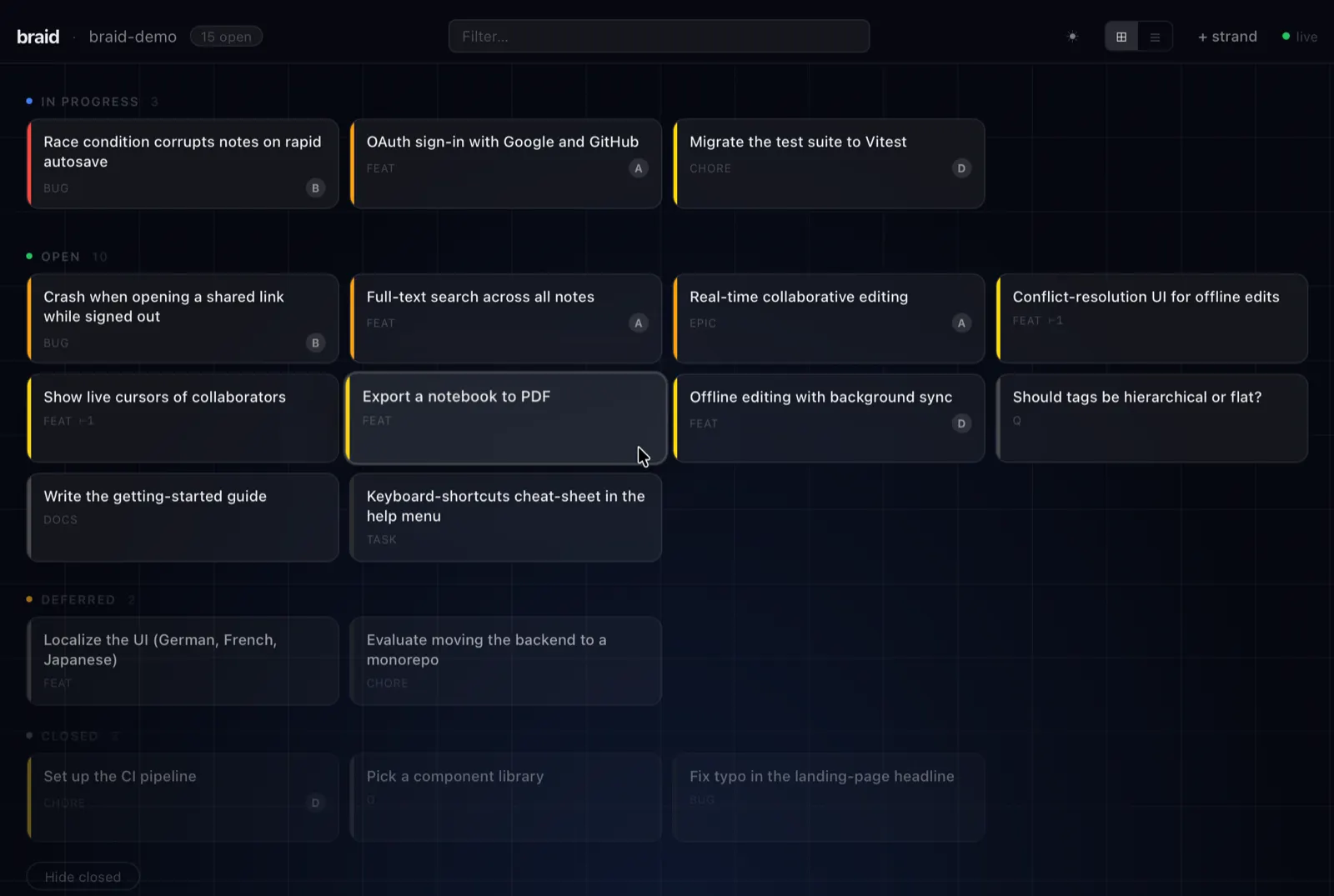
Opens the skein in your browser — a quick way to browse, triage, and edit strands without the terminal. Strands are laid out in lanes by status, each card colour-coded by priority, with live search, a light/dark theme, and inline editing.
For a standalone desktop app (multiple projects, no CLI or local server required), see braid-viewer.
braid-viewer — desktop app
braid-viewer is a native desktop app built with Tauri v2
that wraps the braid React UI. It lets you open multiple braid project folders,
switch between skeins, and sync directly to your sync server — no CLI or local
server required.
Running / building
# Development (hot-reload; requires tauri-cli and Node.js)
cargo xtask viewer-dev

# Release app (Tauri bundle — .app/.exe/.AppImage). The only command that
# produces a *runnable* standalone app.
cargo xtask viewer-build
Install tauri-cli once:
cargo install tauri-cli --version '^2' --locked
The viewer’s frontend (project chooser, switching, add/remove) has React
component tests under ui/src/*.test.tsx (vitest + Testing Library, with Tauri
and automerge mocked). Run them with:
cargo xtask test-ui # or: cd ui && npm run test
They also run as part of cargo xtask ci and in ci.yml.
Do not run
cargo build --release -p braid-viewerto launch the app. In Tauri v2 a runnable binary requires thecustom-protocolfeature, which only the Tauri CLI (cargo tauri build/cargo xtask viewer-build) sets. A plaincargo buildomits it, so the binary starts in dev mode and tries to load the Vite dev server (http://localhost:5173); with no dev server running you get a blankERR_CONNECTION_REFUSEDwindow.cargo build -p braid-vieweris therefore only a compile smoke check (whatviewer.ymlCI runs) — not a way to produce a usable app.
Logs
The app logs to stdout and to a rotating braid-viewer.log in the platform log
directory:
- Linux:
~/.local/share/org.cscheid.braidviewer/logs/ - macOS:
~/Library/Logs/org.cscheid.braidviewer/ - Windows:
%APPDATA%\org.cscheid.braidviewer\logs\
A startup line records each window’s resolved URL — if it shows
http://localhost:5173 you built a dev binary (see the warning above). Because
the release exe runs with no console on Windows, this file is the primary way to
debug a launch failure. Logs are also forwarded to the webview console
(right-click → Inspect; available in release because the devtools feature
is enabled).
Installing a release bundle
Pre-built desktop bundles (macOS .dmg, Windows installer, Linux
.AppImage/.deb) are attached to each
release. They are currently
unsigned — on macOS, right-click → Open the first time; on Windows, choose
“More info → Run anyway” at the SmartScreen prompt.
Per-OS prerequisites
Linux (Ubuntu / Debian)
sudo apt-get install -y \
  libwebkit2gtk-4.1-dev libgtk-3-dev \
  libayatana-appindicator3-dev librsvg2-dev \
  libsoup-3.0-dev build-essential
Minimum supported: Ubuntu 22.04 (ships WebKitGTK 4.1).
macOS
Xcode Command Line Tools (xcode-select --install). No extra packages needed.
First launch on macOS may show a quarantine dialog — right-click → Open to bypass, or:
xattr -dr com.apple.quarantine target/release/braid-viewer
Windows
MSVC toolchain + WebView2 runtime (ships with Windows 10 1803+ / Windows 11).
Build with x86_64-pc-windows-msvc.
Adding projects
- Launch
braid-viewer. - Click + Add project and pick a folder that contains a
.braid.tomlwith adoc_id. - The viewer connects to the sync server declared in that folder’s
.braid.toml(orwss://sync.automerge.orgby default).
The viewer remembers the last-opened project across restarts. Project paths
are stored in ~/.config/braid/viewer.toml — paths only, never secrets.
Switching / removing projects
- Switch: click ⇄ Projects in the header to return to the chooser, then pick another registered project (or add one). Switching shuts down the previous skein’s sync connection before opening the next, so only the active project syncs.
- Remove: in the chooser, click the × next to a project to drop it from
the list (
viewer.toml). This only forgets the path — it never touches the folder or its.braid.toml. Removing the project you’re currently in returns you to the chooser.
Offline / warm start
The viewer caches each project’s skein in IndexedDB (via
@automerge/automerge-repo-storage-indexeddb), namespaced by folder path. The
backend pins the webview’s data_directory to the OS app-local data dir
(app_local_data_dir, e.g. %LOCALAPPDATA%\org.cscheid.braidviewer on Windows,
~/.local/share/org.cscheid.braidviewer on Linux) so that cache survives
restarts deterministically. Cached data loads instantly and while the sync
server is unreachable; offline edits merge back on reconnect (automerge is a
CRDT, so this is conflict-free).
Verify per OS: IndexedDB persistence under WebKitGTK (
tauri://scheme on Linux) has been historically unreliable. Confirm warm start on each target — launch, sync, quit, relaunch offline, and check the skein loads without the server.
Relationship to the braid CLI cache
The viewer’s cache is independent of the braid CLI’s. They are separate
automerge replicas of the same document using different storage engines:
- CLI:
samodfilesystem storage atXDG_CACHE_HOME/braid(~/.cache/braid). - Viewer: browser IndexedDB inside the pinned webview
data_directoryabove.
They can’t (and shouldn’t) share a directory — the formats differ. Both sync to the same server, so they converge there; a CLI edit appears in the viewer once both have synced (they don’t talk directly — only through the sync server).
Custom sync servers (allowed_sync_servers)
By default the CSP allows wss://sync.automerge.org. The sync server of every
registered project is also added to the allowlist automatically. To permit a
server before any project on it is registered, add it to
~/.config/braid/viewer.toml:
allowed_sync_servers = ["wss://my-server.example.com"]
The allowlist is built once at startup (registered project servers +
allowed_sync_servers) and applied to the webview’s connect-src. A project
added at runtime on a non-default server therefore needs a viewer restart
before it can sync — or pre-declare the server in allowed_sync_servers.
Architecture
braid-viewer window
  └── Webview: ui/ React app
        ├── isTauri() → true → ViewerShell
        │     ├── invoke("list_projects_cmd")
        │     ├── invoke("add_project_cmd", { folder })
        │     └── invoke("get_config_cmd", { folder }) → docUrl + syncServer
        └── automerge-repo (WASM) ↔ wss://sync-server (direct, no Rust relay)
              └── IndexedDBStorageAdapter (namespaced per project)

Rust backend (braid-viewer): thin Tauri shell
  └── depends on braid-config (lean: no tokio/axum/samod)
        ├── viewer.rs  — project registry (viewer.toml, paths only)
        └── ui_config.rs — reads <folder>/.braid.toml, never walks up
Switching projects calls repo.shutdown() on the previous repo before
creating a new one, so only the active skein’s WebSocket stays open.
braid MCP server
braid mcp serves a skein to MCP hosts over stdio — for agents that have
no shell (Claude Desktop, claude.ai connectors via a local proxy, IDE
assistants) or that you deliberately don’t give a shell.
Why MCP instead of the CLI + skill?
For shell-capable agents, the CLI + braid agents-info skill remains the
preferred interface. The MCP server adds three things the CLI cannot:
- Shell-less agents get a door into the skein.
- Capability isolation: the server process holds the skein secret;
the agent calls tools and never possesses the doc id. There is no
.braid.tomlfor it to read and nobraid secretfor it to be talked into running — you can’t leak what you never see. (The e2e suite asserts the doc id appears in no protocol message.) - A long-lived session: no per-command dial latency, continuous sync, and (coming) change notifications.
Host setup
The server reads the normal braid configuration (env >
.braid.toml walk-up > user config) from its working directory, or from
--project <dir>.
Claude Code (.mcp.json in the project, or claude mcp add):
{
  "mcpServers": {
    "braid": {
      "command": "braid",
      "args": ["mcp"],
      "env": { "BRAID_AUTHOR": "claude" }
    }
  }
}
Claude Desktop (claude_desktop_config.json):
{
  "mcpServers": {
    "braid": {
      "command": "/path/to/braid",
      "args": ["mcp", "--project", "/path/to/your/project"],
      "env": { "BRAID_AUTHOR": "desktop" }
    }
  }
}
Identity is server-level (BRAID_AUTHOR, falling back through the usual
chain); there is deliberately no per-call author parameter.
Capability tiers
| launch | tools served |
|---|---|
braid mcp --read-only | queries only: ready, blocked, list, show, search, dep_list, dep_tree, dep_cycles, export |
braid mcp (default) | queries + reversible mutations: create, update, close, reopen, defer, undefer, comment, dep_add, dep_remove |
braid mcp --enable-destructive | everything + braid_delete and braid_import (no undo: a delete wins over concurrent edits; import overwrites same-id strands) |
Gating is enforced at call time as well as in tools/list: a tool the
server was not launched to serve refuses even if called by name. secret,
init, and rotate are never tools under any flag — they are
operator decisions made at a shell.
Every tool carries honest MCP annotations (readOnlyHint,
destructiveHint, idempotentHint, openWorldHint: false) so hosts can
build confirmation UX; annotations are hints, the launch flags are the
enforcement.
Resources and notifications
Three subscribable resources (all application/json, none ever carrying
the doc id):
| uri | contents |
|---|---|
braid://skein | name, strand counts (total / by status / ready), connection state and convergence (online, in_sync), author — the status surface; there is deliberately no sync tool |
braid://ready | the ready queue ({strands, count}) |
braid://strand/{id} | one strand as a schema-conformant record (unique id fragments work) |
resources/subscribe to any braid:// URI; on every document change
(local or remote — bursts coalesced), the server pushes
notifications/resources/updated for each subscription. “Tell me when my
blocker closes” = subscribe to braid://ready (or the blocker’s strand
URI) and re-read on notification.
Semantics worth knowing
- Tool outputs are
structuredContent; strand records conform to the published JSON Schema. braid_listandbraid_readyaccept optional field filters:labels(array — a strand must carry all of them),assignee(exact match; unassigned strands never match),type, andpriority(array of 0..=4 — a strand matches if its priority is any of them).braid_listadditionally takesstatus/all, mirroring the CLI flags.braid_createaccepts an optionaldepsarray of<type>:<target-id>strings (e.g.discovered-from:br-abc); the new strand depends on each target, attached atomically — a missing target fails the call and creates nothing.braid_importrecognizes beads tombstones (soft-deleted records:status:"tombstone"or adeleted_at/delete_reason/deleted_bymarker) and skips them; its result reports bothimportedandskippedcounts.- Mutation results carry
sync: "confirmed" | "unconfirmed" | "offline"— whether the sync server acknowledged the change. Offline keeps working; results tell the truth. There is no sync tool: the session syncs continuously. - If the skein is rotated while the server runs, every tool starts
failing with the rotation message. Adoption is an operator action at a
shell (
braid rotate --adopt); restart the server afterwards. - stdout is the protocol channel; diagnostics go to stderr.
Migrating from beads
braid init --prefix bd      # keep your bd- issue ids consistent
braid import .beads/issues.jsonl
Import upserts by issue id and accepts both beads JSONL and braid’s own
braid export output (which is also your backup / grep surface:
braid export | grep -i crlf). beads’ integer comment ids are replaced
with collision-free string ids; beads-only fields (source_repo,
compaction machinery, etc.) are dropped.
Export records conform to a published JSON Schema —
schemas/strand.schema.json — the contract
for downstream tooling; see the JSONL contract for import
tolerances and the deltas vs the automerge document shape.
braid JSONL contract
braid export writes the skein as JSONL: one strand record per line,
sorted by id, each line conforming to
strand.schema.json (JSON Schema draft 2020-12).
This is the contract for downstream tooling — dashboards, analyzers,
backups, anything that consumes braid data without speaking automerge.
Contract tests in crates/braid/tests/schema_contract.rs validate real
braid export output against the schema, so drift between the
implementation and this contract fails the test suite.
Writer vs reader: strict out, tolerant in
The schema describes what braid writes (strict: required fields,
additionalProperties: false). braid import accepts a superset:
| import tolerance | normalized to |
|---|---|
beads-style dependencies / comments as arrays | keyed maps |
| beads integer comment ids | fresh c-<base36> string ids |
"completed" status | "closed" |
missing priority / issue_type | 2 / "task" |
missing timestamps / created_by | import time / "unknown" |
unknown top-level fields (source_repo, compaction_level, …) | dropped |
Records already in braid’s own export shape round-trip byte-exactly (comment ids and map keys preserved).
Import does enforce the constraints the schema asserts — notably ids must contain no colons or whitespace — because anything import accepts, export will later emit, and braid’s own output must conform to its own contract.
Relationship to the automerge document
The skein lives in an automerge document whose shape is one-to-one with these records, with three deliberate deltas:
- Prose fields (
description,design,acceptance_criteria,notes, commenttext) are collaborativeTextobjects in the document (concurrent edits interleave); in JSONL they are plain strings. labelsis a map-as-set in the document (key presence = membership); in JSONL it is a sorted, deduplicated array.- The document has a top-level
metadataobject (schema_version,name,id_prefix,created_at) and anissuesmap keyed by strand id. JSONL flattens to just the strands; metadata is not exported.
dependencies and comments are keyed maps in both representations
(keys are collision-free, so concurrent inserts converge).
Versioning
The automerge document carries metadata.schema_version (currently
1); braid refuses documents with a different version. This JSONL schema
is version-matched to the braid release that ships it (see the
$comment in the schema) and evolves in lockstep: a new document schema
version implies a new strand schema. Downstream tooling pinning this
schema should re-validate when upgrading braid.
Semantics consumers commonly need
- active statuses:
open,in_progress; terminal:closed. Unknown statuses: treat as neither. - ready = active status and no
blocks/conditional-blocks/waits-foredge whose target exists in the skein with a non-terminal status. (parent-childnever blocks the child; open children gate the parent’s close instead.) - Dependency map keys are
<depends_on_id>:<type>— informational; read the entry’s fields rather than parsing keys. - Dangling dependency targets are legal and never block.
Development
cargo test        # 120+ tests, no network required (default-members only)
cargo clippy --all-targets
The workspace has four crates: braid-core (schema, automerge
hydrate/reconcile, ready/blocked logic — no I/O), braid (CLI, config
discovery, cache, sync), braid-config (lean config/registry shared by
braid and braid-viewer), and braid-viewer (Tauri desktop app, excluded
from default builds — use cargo xtask viewer-* or -p braid-viewer).
Design decisions and phase history live in
claude-notes/plans/2026/06/03/braid-design-kickoff.md; vocabulary in
terminology. This repo dogfoods braid — run braid list
here to see its own skein.
Building these docs
This site is an mdBook built from the
docs/ directory (book.toml at the repo root, docs/SUMMARY.md is the
table of contents):
cargo install mdbook        # once
cargo xtask docs            # build to book/
cargo xtask docs-serve      # live-reload preview at http://localhost:3000
Every docs/*.md page must be listed in docs/SUMMARY.md — a drift test
(crates/braid/tests/docs_drift.rs) fails the build otherwise. Pushes to
main publish the site via .github/workflows/docs.yml.